Web and Software Development

Torque HTTP Vulnerability Scanner

Torque Scanner

Torque Scanner is a cross‑platform network reconnaissance and audit tool designed to perform repeated HTTP requests with randomized user agent rotation, timing jitter, and optional Tor routing. It provides real‑time feedback through a web‑based control panel which automatically launches in your default browser.

Download Bundle

1. Launching the Application

Run the binary appropriate for your system:

./torque-scanner      (Linux / macOS)
torque-scanner.exe    (Windows)
  

On launch, Torque Scanner starts a small local web server and attempts to open your browser automatically. If it does not open, the terminal will display the URL:

http://127.0.0.1:xxxxx/
  

Copy this into your browser manually.

2. The Control Panel Interface

Once opened, you will see the main interface containing:

  • Target URL – The website or endpoint to be scanned.
  • Request Count – Total number of HTTP GET requests to send.
  • Concurrency – Number of workers (threads).
  • Jitter Settings – Random timing delays between requests.
  • Retry & Backoff Settings – Controls how failed requests are repeated.
  • Tor Settings:
    • Use Tor – Routes traffic through a SOCKS5 Tor proxy at 127.0.0.1:9050.
    • Tor NEWNYM – Requests a new Tor identity between requests (requires the Tor control port at 127.0.0.1:9051).
  • Real‑time Output Panel – Displays live request logs via SSE.

3. Starting a Scan

Enter your target URL (e.g., http://example.com). Set your preferred options and click:

INITIATE ATTACK PROBE
  

You will see each request logged in real time, including:

  • Worker ID
  • HTTP status codes
  • User‑Agent string selected
  • Tor routing notes
  • Retry attempts and backoff delays

4. Stopping a Scan

CEASE ATTACK PROBE
  

Workers will complete any in‑progress request and halt gracefully.

5. Tor Status Indicator

At the top of the UI, Torque Scanner displays:

  • SOCKS5 availability (port 9050)
  • Control port availability (port 9051)

These indicators update every 3 seconds.

6. Log Files

All scans are logged into:

./logs/tor_scanner_YYYYMMDD_HHMMSS.log
  

These logs can be used for security audits, debugging, and evidence collection.


Technical Overview & Internal Architecture

1. Overview

Torque Scanner is a concurrency‑driven network interrogation tool designed to evaluate:

  • Endpoint rate limiting
  • User‑agent filtering behavior
  • Load balancing characteristics
  • Tor behavior (through different identities)
  • Error handling and response reliability
  • Infrastructure resiliency under controlled request bursts

It is not a stress‑testing tool. Its purpose is security auditing and behavioral analysis, not overwhelming a service.

2. Architecture Summary

The software is built as a single Go program embedding both an HTTP server and a full web interface.

A. Web UI Server

  • Serves the embedded HTML GUI.
  • Provides:
    • /start – Begins a scan.
    • /stop – Halts a scan.
    • /events – SSE endpoint for live logs.

B. Worker Engine

  • A configurable number of goroutines pull jobs from a channel.
  • Each job represents a single HTTP GET request.
  • Workers:
    • Randomize a user agent
    • Sleep for jitter delay
    • Attempt request with retry & exponential backoff
    • Broadcast results via SSE

C. User Agent Management

  • Loads user-agents.txt if found.
  • Otherwise uses a compact built‑in list.
  • Random selection per request.

D. Tor Integration

Torque Scanner can direct all traffic through:

socks5://127.0.0.1:9050
  

Workers may optionally trigger a NEWNYM request on the control port, forcing a new Tor exit node identity.

E. Real‑Time Logs (SSE)

All activity is broadcast through Server‑Sent Events:

  • Low latency
  • Auto‑reconnecting
  • Live streaming to all connected browsers

F. Logging Subsystem

Every request is logged to file with:

  • Timestamp
  • Target
  • Worker ID
  • Status code
  • User agent
  • Retry attempts
  • Tor usage notes

3. Why Torque Scanner Is Useful

  • Web Security Testing
  • Tor privacy analysis
  • Endpoint reliability testing
  • Infrastructure diagnostics
  • Educational & research purposes

4. Cross‑Platform Support

  • Linux (x86_64, ARM, ARM64)
  • Windows
  • macOS
  • Raspberry Pi (ARM)

5. Ethical Usage

Torque Scanner is intended for:

  • Your own systems
  • Systems you have permission to test
  • Security auditing and research

Do not use it on systems where you lack authorization.

K0NxT3D

Mail Server Vulnerability Scanner

Mail Server Vulnerability Scanner

Mail Server Vulnerability Scanner: Ensuring Your Mail Server’s Security

In today’s digital landscape, securing your mail server against vulnerabilities is paramount. A compromised mail server can expose your domain to hackers, increase the risk of spam, and even lead to unauthorized access to sensitive information. Our Mail Server Vulnerability Scanner is a powerful tool designed to help administrators assess their email systems for potential weaknesses, ensuring a robust defense against cyber threats.

What is a Mail Server Vulnerability Scanner?

A Mail Server Vulnerability Scanner is a specialized application used to monitor and analyze mail servers for various security risks and vulnerabilities. This includes identifying issues like open relay, weak configurations, and possible exploits that hackers could use to compromise the server. The tool is intended to be used by professionals and legal entities who wish to protect their infrastructure and ensure their email systems are secure.

Key Features and Uses

  1. SMTP Vulnerability Checks
    The scanner tests for common vulnerabilities in the SMTP (Simple Mail Transfer Protocol) settings, including the potential for an open relay. An open relay allows unauthorized users to send emails through your server, turning it into a spam distributor. By identifying and addressing these vulnerabilities, you can prevent your server from being exploited by hackers.
  2. Domain Mail and Configuration Audits
    It checks the configurations of domain mail setups, ensuring they are correctly structured and secure. This includes verifying settings such as DNS records, SPF (Sender Policy Framework), and DMARC (Domain-based Message Authentication, Reporting & Conformance) to prevent email spoofing and phishing attacks.
  3. Real-Time Monitoring and Alerts
    The scanner can continuously monitor your mail server for vulnerabilities, providing real-time alerts and actionable insights. This allows you to act swiftly and address any issues before they can be exploited.
  4. Security Reporting and Defensive Measures
    After scanning, the application generates a detailed report outlining any vulnerabilities found along with recommendations for defensive measures. This empowers administrators to implement the appropriate patches and security configurations, protecting the server from attacks.

How to Use the Mail Server Vulnerability Scanner

  1. Install the Application
    Download and install the Mail Server Vulnerability Scanner from our official website. The tool is designed for ease of use, with a user-friendly interface for seamless setup.
  2. Enter Your Domain Details
    Once installed, enter your mail server’s domain information and SMTP configurations. The scanner will automatically begin analyzing your mail server for vulnerabilities.
  3. Run the Scan
    Click on the “Run Tests” button to initiate the vulnerability check. The scanner will systematically assess the server for known vulnerabilities and misconfigurations.
  4. Review the Report
    After the scan completes, review the detailed report provided by the application. This report will highlight any potential weaknesses along with step-by-step guidance on how to fix them.
  5. Implement Security Recommendations
    Based on the findings, apply the necessary changes and updates to your mail server’s configuration. This may include closing open relays, adjusting authentication protocols, or updating software versions.

Disclaimer

This application is intended for professional and legal use only. Unauthorized use of this tool on mail servers you do not own or have explicit permission to test could be illegal and result in severe consequences. Always ensure that you have the appropriate authorization before using the Mail Server Vulnerability Scanner on any server.

By using this tool responsibly, you can enhance the security and integrity of your email systems, making them more resistant to potential threats from hackers.

Available For Professional Use Only – No Public Download Available

Cybercriminals Weaponizing Open-Source SSH-Snake Tool for Network Attacks

SSH-Snake, a self-modifying worm that leverages SSH credentials.

Original Article : The Hacker News

A recently open-sourced network mapping tool called SSH-Snake has been repurposed by threat actors to conduct malicious activities.

“SSH-Snake is a self-modifying worm that leverages SSH credentials discovered on a compromised system to start spreading itself throughout the network,” Sysdig researcher Miguel Hernández said.

“The worm automatically searches through known credential locations and shell history files to determine its next move.”

SSH-Snake was first released on GitHub in early January 2024, and is described by its developer as a “powerful tool” to carry out automatic network traversal using SSH private keys discovered on systems.

In doing so, it creates a comprehensive map of a network and its dependencies, helping determine the extent to which a network can be compromised using SSH and SSH private keys starting from a particular host. It also supports resolution of domains which have multiple IPv4 addresses.

“It’s completely self-replicating and self-propagating – and completely fileless,” according to the project’s description. “In many ways, SSH-Snake is actually a worm: It replicates itself and spreads itself from one system to another as far as it can.”

BotNet CNC Control Hacker Inflitration Exploits Vulnerabilities SSH TCP Bots Hardware Software Exploited

BotNet CNC Control Hacker Infiltrates & Exploits Vulnerabilities Vie SSH TCP Both Hardware Software Exploited

Sysdig said the shell script not only facilitates lateral movement, but also provides additional stealth and flexibility than other typical SSH worms.

The cloud security company said it observed threat actors deploying SSH-Snake in real-world attacks to harvest credentials, the IP addresses of the targets, and the bash command history following the discovery of a command-and-control (C2) server hosting the data.

How Does It Work?

These attacks involve active exploitation of known security vulnerabilities in Apache ActiveMQ and Atlassian Confluence instances in order to gain initial access and deploy SSH-Snake.
“The usage of SSH keys is a recommended practice that SSH-Snake tries to take advantage of in order to spread,” Hernández said. “It is smarter and more reliable which will allow threat actors to reach farther into a network once they gain a foothold.”

When reached for comment, Joshua Rogers, the developer of SSH-Snake, told The Hacker News that the tool offers legitimate system owners a way to identify weaknesses in their infrastructure before attackers do, urging companies to use SSH-Snake to “discover the attack paths that exist – and fix them.”

“It seems to be commonly believed that cyber terrorism ‘just happens’ all of a sudden to systems, which solely requires a reactive approach to security,” Rogers said. “Instead, in my experience, systems should be designed and maintained with comprehensive security measures.”

Netcat file transfer chat utility send receive files

Netcat file transfer chat utility. Easily Send & Receive Files Local & Remote.

“If a cyber terrorist is able to run SSH-Snake on your infrastructure and access thousands of servers, focus should be put on the people that are in charge of the infrastructure, with a goal of revitalizing the infrastructure such that the compromise of a single host can’t be replicated across thousands of others.”

Rogers also called attention to the “negligent operations” by companies that design and implement insecure infrastructure, which can be easily taken over by a simple shell script.

“If systems were designed and maintained in a sane manner and system owners/companies actually cared about security, the fallout from such a script being executed would be minimized – as well as if the actions taken by SSH-Snake were manually performed by an attacker,” Rogers added.

“Instead of reading privacy policies and performing data entry, security teams of companies worried about this type of script taking over their entire infrastructure should be performing total re-architecture of their systems by trained security specialists – not those that created the architecture in the first place.”

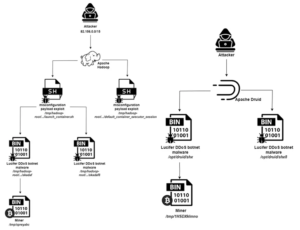
The disclosure comes as Aqua uncovered a new botnet campaign named Lucifer that exploits misconfigurations and existing flaws in Apache Hadoop and Apache Druid to corral them into a network for mining cryptocurrency and staging distributed denial-of-service (DDoS) attacks.

The hybrid cryptojacking malware was first documented by Palo Alto Networks Unit 42 in June 2020, calling attention to its ability to exploit known security flaws to compromise Windows endpoints.
As many as 3,000 distinct attacks aimed at the Apache big data stack have been detected over the past month, the cloud security firm said. This also comprises those that single out susceptible Apache Flink instances to deploy miners and rootkits.

“The attacker implements the attack by exploiting existing misconfigurations and vulnerabilities in those services,” security researcher Nitzan Yaakov said.

Apache Vulnerability Update Available!

Apache Vulnerability Update Available!

“Apache open-source solutions are widely used by many users and contributors. Attackers may view this extensive use as an opportunity to have inexhaustible resources for implementing their attacks on them.”

Seaverns Web Development Coding Security Applications and Software Development Bex Severus Galleries Digital Art & Photography

Apache Security Update Jammy Apache2 Php Linux Ubuntu/Raspberry Pi x64 | x32 RPI 3 – 4

Apache Security Update Jammy Apache2 Php Linux Ubuntu/Raspberry Pi x64 | x32 RPI 3 – 4

I certainly get a lot of attacks and nothing is ever really “Secure”.
That being said, there are some serious vulnerabilities running around, you might want to do some updating to your Apache Servers and Php.
After a recent batch of installs, I was able to exploit both Apache2 and Php pretty easily, so this will be common.

To test for the recent list of vulnerabilities and open exploits on Your Own Machines, you can run:

nmap -Pn -sV -p80 --script=vulners -oN output.txt 127.0.0.1

If you’re running several hosts:
nmap -Pn -sV -p80 –script=vulners -oN output.txt 192.168.1.0/24
This will scan your local network for any vulnerable hosts and sure enough, the new upgrades had some issues.

The Fix:

Linux Ubuntu (x64):

sudo add-apt-repository ppa:ondrej/apache2
sudo add-apt-repository ppa:ondrej/php

sudo apt update -y
sudo apt upgrade -y

This will work in just about every case – Except with the RPI3 Series.
This one’s a little longer, but it works and you can thank me later.

RPI 3B+ (x32/Jammy)

sudo apt-get install software-properties-common

Just In Case..

Apply Fix:

curl https://packages.sury.org/php/apt.gpg | sudo tee /usr/share/keyrings/suryphp-archive-keyring.gpg >/dev/null

echo "deb [signed-by=/usr/share/keyrings/suryphp-archive-keyring.gpg] https://packages.sury.org/php/ $(lsb_release -cs) main" | sudo tee /etc/apt/sources.list.d/sury-php.list

curl https://packages.sury.org/apache2/apt.gpg | sudo tee /usr/share/keyrings/suryapache2-archive-keyring.gpg >/dev/null

echo "deb [signed-by=/usr/share/keyrings/suryapache2-archive-keyring.gpg] https://packages.sury.org/apache2/ $(lsb_release -cs) main" | sudo tee /etc/apt/sources.list.d/sury-apache2.list

sudo apt update -y
sudo apt upgrade -y

sudo systemctl restart apache2

Resources:
Sury.ORG (Highly Recommended)
https://sury.org/

NMap: (Do You Even Web?)
https://nmap.org/